

You want your coding agent to investigate a failed Power Automate flow. Can it read the failed run, or can it only work with the error you paste into chat?
That depends on the tools you connect. A skill can guide the investigation, but the agent also needs access to the run details. Plugins, skills and MCP servers often appear in the same setup guide because they do different parts of the job.
At Power Platform Community Conference last week, I had several conversations about this topic. People were really looking for an overview: what is available, which tools come from Microsoft and where to start.
That's why I've collected Microsoft's Power Platform tools and a selection of community alternatives below, with starting points for common jobs. Pick the job first, then the package. You don't need the whole catalog to fix one flow.
I'll try to keep this post as up to date as possible as new tools come out and existing ones change.
What are plugins, skills and MCP servers?
A coding agent is the development assistant you work with, such as GitHub Copilot or Claude Code. It is different from the business agent you might build in Copilot Studio.
Model Context Protocol (MCP) is a standard way to connect an AI assistant to tools and data. A plugin can package an MCP connection with skills that explain how to use it.
| What | What it adds | Example |
|---|---|---|
| Plugin | An installable package of skills and, sometimes, connected tools | The Power Automate plugin |
| Skill | Instructions for a particular job, sometimes with supporting scripts | How to build a flow or deploy a solution |
| MCP server | Tools the coding agent can discover and call | Read Dataverse records or check Canvas App files |
| Custom agent | A specialist assistant that handles part of the work | Build one screen of a Canvas App |
| CLI | A command-line interface, run in a terminal | Power Platform CLI, usually called PAC CLI |
| SDK | A software development kit: libraries for writing code against a service | The Dataverse Python SDK |
For Dataverse, the plugin teaches the coding agent when to use MCP, the Dataverse CLI, the Python SDK or PAC CLI. The MCP server lets it perform operations such as querying records and creating tables. Connecting directly to that server won't give you the plugin's guidance for importing related records or deploying a solution.
Also, "Dataverse plugin" here means a coding-agent package. It does not mean a C# plug-in registered in Dataverse.
Where I would start
If you already have a job in mind, you don't need to read every entry:
- To work with Dataverse records, tables or solutions, start with the Dataverse plugin.
- To build or troubleshoot cloud flows, start with the Power Automate plugin.
- To create or change a Canvas App, look at the Canvas Apps plugin. Keep Power Apps Studio open while it works.
- To build a Copilot Studio agent, read the authoring tools section first. The options depend on the type of agent you are building.
For example, after setting up the Power Automate plugin, you could ask:
Find out why the Invoice Processing flow failed on its latest run.
Explain the failing step and suggest a fix.
Don't change the flow until I approve it.
Look for an answer that names the failing action and explains the error using the run details. A plausible fix based only on the flow's name isn't enough. The prompt asks for investigation first, with your approval before any changes.
The full catalog below also covers code apps, model-driven apps, Power Pages, custom controls and mobile development.
Microsoft's Power Platform plugin marketplace
I would start with microsoft/power-platform-skills. It is Microsoft's official Power Platform development plugin marketplace, with installation instructions for GitHub Copilot CLI and Claude Code.
All 11 entries below are Microsoft-published. Publication isn't a promise of product support: check each project's release status and support terms.
| Plugin | Install name | What it does |
|---|---|---|
| Dataverse | dataverse | Work with records, tables, solutions, administration and security. Includes linked Finance and Operations X++ development. |
| Canvas Apps | canvas-apps | Create and edit Canvas Apps through local .pa.yaml files and an open Power Apps Studio session. |
| Power Automate | power-automate | Build, edit, run and troubleshoot cloud flows; manage connections and publishing. |
| Model Apps | model-apps | Build model-driven apps: tables, forms, views, charts, security roles, navigation and generative pages. |
| Code Apps | code-apps-preview | Build and deploy React, Vite and TypeScript code apps connected to Power Platform services. |
| Power Pages | power-pages | Create and publish code sites, including data, permissions, sign-in and testing. Currently limited to code sites. |
| PCF | pcf | Build, troubleshoot and deploy custom controls using the Power Apps component framework (PCF). Explicitly marked preview. |
| Mobile Apps | mobile-app | Build mobile code apps with Expo and React Native, including device features and offline data. |
| Power Apps Mobile Extension | power-apps-mobile-extension | Build Android and iOS controls for Canvas Apps packaged as mobile apps, with companion PCF controls and .ppmplugin packages. |
| MCP Apps | mcp-apps | Generate JavaScript MCP tools and interactive HTML widgets using the MCP Apps protocol. |
| Process Intelligence | process-intelligence | Analyze Process Mining data for bottlenecks, different process routes and repeated work. |
Dataverse lives in its own repository, which this marketplace points to. If you already installed it through another marketplace, you don't need another copy. Duplicate installs can load the same skills twice.
For a manual installation, the marketplace documents commands such as:
/plugin marketplace add microsoft/power-platform-skills
/plugin install power-automate@power-platform-skills
/plugin install canvas-apps@power-platform-skills
In the GitHub Copilot app, use its plugin and MCP configuration options.
For Codex, Cursor or another client, check the package's installation instructions. The Dataverse plugin documents several options, but not every plugin works in every client. Some clients support a native plugin; others can load the skills or connect to the MCP server separately.
Which skills would you use?
You don't need to memorize the skill names to start. Describe the job, then check that the plugin has the skills and connected tools for it.
Two limits are worth knowing before you try:
- The Power Automate plugin can find and run desktop flows and work with machine groups. It cannot edit Power Automate Desktop scripts.
- Canvas Apps uses a live Power Apps Studio session to find controls and data sources, sync local app files and check that they compile. Keep the Studio tab open while the coding agent works.
Skill names and technical details
For Dataverse, dv-connect handles setup. dv-query reads data and dv-data changes it. Use dv-metadata for table design and dv-solution for packaging and deploying solutions. dv-admin and dv-security cover administration and access. dv-overview provides shared guidance, while erp-xpp covers linked Finance and Operations development.
The Power Automate plugin separates guided creation (create-flow) from building a complete flow from a description (build-flow). It also separates interactive debugging (debug-flow) from a deeper investigation of a specific failed run (diagnose-flow). Other skills help you find flows, manage publishing and testing, and check how environments are selected.
The desktop-flow skill is called manage-desktop-flows.
For Canvas Apps, canvas-app handles creation and editing. The plugin also includes specialist planning and screen-building agents.
Model Apps has app-builder for a whole model-driven app and genpage for generative pages, which use React and TypeScript inside the app. MCP Apps has generate-codeful-mcp-tool for the server code and generate-mcp-app-ui for its interactive widget.
Process Intelligence is a different kind of tool. Skills such as investigate-process, analyze-variants and compare-cohorts help answer questions about how a process runs. You would use it to investigate a bottleneck, not to build the flow that fixes it.
Copilot Studio has separate authoring tools
For Copilot Studio, choose the agent type before the plugin. Skills for Copilot Studio explicitly describes itself as an experimental project rather than a supported product.
The repositories use "harness" for the software that runs an agent and its tools. Here, that describes how the Copilot Studio agent will run, not whether you use Claude Code or GitHub Copilot to build it.
Both plugins are owned by the Microsoft Customer Advisory Team (CAT). Choose the plugin for the harness your agent uses in Copilot Studio:
- Standard harness agents: use microsoft/skills-for-copilot-studio.
- Copilot harness agents: use microsoft/copilot-studio-plugin. Its repository also calls this the GitHub Copilot harness.
| Tool | Ownership | What it does |
|---|---|---|
| Copilot Studio MCP | Microsoft | Connect a coding agent to Copilot Studio to find, build, test and manage agents and workflows, investigate failures and check credit usage. |
| Copilot Studio Authoring Plugin | Microsoft CAT Team | For Copilot harness agents in Copilot Studio. Create, edit, validate and migrate agents. Installed as mcs-assistant. |
| Skills for Copilot Studio | Microsoft CAT Team | For standard harness agents in Copilot Studio. Edit YAML text files, sync changes, test behavior and get design advice. |
| Copilot Studio VS Code extension | Microsoft | Clone agents, edit their components with language support, preview changes and synchronize local files with the environment. |
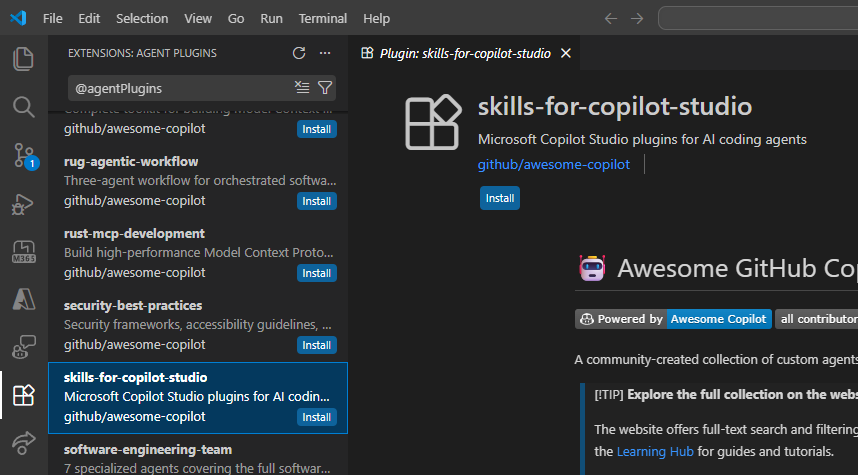
Skills for Copilot Studio in VS Code's Agent Plugins view. This experimental project targets standard harness agents in Copilot Studio.
Screenshot from Microsoft's Skills for Copilot Studio repository, reused under its MIT license.
Saving a draft and publishing it are separate operations. Ask for a draft first if you want to review the agent before making it available.
Copilot Studio skill names and how the guidance is loaded
The Copilot harness plugin includes create-agent, clone-agent, pull-agent, push-agent, publish-agent, delete-agent, add-knowledge and add-skill. The standard harness plugin has specialist entry points for managing, authoring, testing and advising on an agent.
With Copilot Studio MCP, the get_copilot_studio_skills tool returns guidance for agent-authoring, workflow-authoring, workflow-troubleshooting and testing-and-credits. The client writes the definitions, then the management tools validate and save them.
In this case, the connected service supplies the skills rather than a local SKILL.md file.
Building an agent is different from giving it tools
Check what a tutorial is trying to do. Copilot Studio and MCP can mean three different things:
- Your coding agent uses Copilot Studio MCP to create or maintain a Copilot Studio agent.
- Your Copilot Studio agent calls an external MCP server to do its work.
- You expose a published Copilot Studio agent to MCP clients.
The Copilot Studio MCP documentation links to separate instructions for each. For this post, the first scenario is the relevant one: using your coding agent to build something in Copilot Studio. A tutorial about giving an existing agent an MCP tool solves a different problem.
Which MCP server is which?
Already installed a plugin? Check what it includes before adding another server. Power Automate includes FlowAgent MCP, Canvas Apps comes with its MCP configuration, and Dataverse has a remote server address in your environment.
| MCP server | What it lets the coding agent do | How it connects |
|---|---|---|
| Dataverse MCP | Find data and table definitions; read, create, update and delete records; work with tables, files and playbooks | Connect to your environment's /api/mcp address after configuring access. |
| PAC CLI built-in MCP | Use PAC CLI operations through natural-language requests | Start locally with pac copilot mcp --run. Documented for local development and testing. |
| Canvas Authoring MCP | Find controls and data sources, sync app files and check that they compile | The plugin configures Microsoft.PowerApps.CanvasAuthoring.McpServer. Keep the Studio session open. |
| FlowAgent MCP | Create and edit flows, inspect failed runs and manage connections | Included locally with the Power Automate plugin. No separate hosted MCP service needed. |
| Copilot Studio MCP | Work with agents and workflows, test their behavior and check credit usage | The @microsoft/copilot-studio-mcp package connects to the hosted service after sign-in and environment selection. |
| Process Mining MCP | Analyze processes, individual cases, process routes and performance measures | A Process Mining service. Explicitly marked preview. |
| Microsoft Learn MCP | Look up Microsoft documentation and code examples | A remote reference service. It doesn't manage your Power Platform resources. |
All the servers in that table are Microsoft offerings. The tools available to you can vary with the service rollout, your environment and your permissions.
There is another naming trap here. Dataverse uses "skill" for server-side skills or playbooks, with MCP tools called upsert_skill and delete_skill. Those aren't the local dv-query or dv-solution instructions in the coding-agent plugin.
For hands-on learning, Microsoft maintains Dataverse MCP labs and Power Platform MCP labs and samples. They are educational repositories, not extra MCP services to install.
Community and commercial alternatives
Microsoft's packages aren't the only options. These projects cover flow operations, app development and the instructions you give an agent. The list includes independent projects and community galleries hosted by GitHub and Microsoft. The descriptions come from their repositories, not a code audit.
| Project | Maintainer | What to look at |
|---|---|---|
| FlowStudio MCP and Power Automate skills | John Liu and Catherine Han (Community) | Build and troubleshoot flows, monitor them and review governance. The open-source skills connect to a paid service. Some monitoring and governance features require a higher subscription tier. |
| Power Platform Skills for Claude Code | Daniel Kerridge (Community) | Skills for designing Dataverse tables, building code apps, C# Dataverse plug-ins and PCF controls, plus web resources, planning and reviews. |
| Power Platform MCP / MyMCP | Clive Oldridge (Community) | Inspect Dataverse table definitions and plug-in logs, and investigate Power Automate runs and individual steps. |
| ROCKET Framework Skill | Craig White (Community) | Skills for scoring and improving agent instructions with the ROCKET framework. It isn't an agent deployment tool. |
| CAT Skill Library | Microsoft CAT team and contributors (Community) | A searchable gallery of skills for Copilot Studio, Cowork and Scout, with instructions and downloads. Includes Microsoft-built and community submissions, plus plugins and automations. The skills are provided as-is. |
| Awesome Copilot | GitHub and contributors (Community) | Power Platform architecture, PCF, code apps, Dataverse Python and MCP connector development resources, along with FlowStudio skills. Check individual authors and dependencies. |
CAT Skill Library and Awesome Copilot are galleries, not single integrations. Check the author, requirements and support terms of the package you choose. Open-source skills can still depend on a paid service, as FlowStudio's do.
Craig White's ROCKET Framework Skill tackles a different problem: are the agent's instructions clear enough? Its example output scores the objectives and constraints, explains what's missing and suggests specific changes.
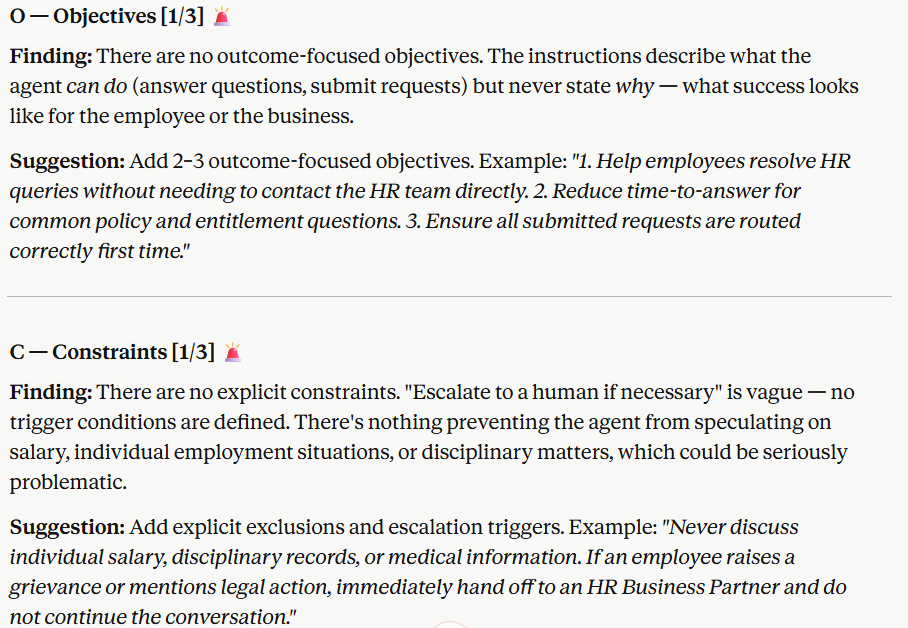
An example of ROCKET feedback: replace vague objectives and escalation instructions with something the agent can follow.
Screenshot from Craig White's ROCKET Framework Skill repository, reused under its MIT license.
MCP or CLI?
People often ask me whether they should use MCP or a CLI. It's a good question.
It reminds me of the "MCP vs Connectors" session Mats Necker and I did. Our message was: don't pick one, use both! The same principle applies here.
The token and authentication tradeoffs below can help you choose the tool for each step.
CLI can use fewer AI tokens
Tokens are the pieces of text an AI model processes, including tool instructions and results. Sending less unnecessary information can reduce cost and leave more room for the task.
A CLI can use fewer tokens when the agent knows the commands and filters the output. A script can do several steps and return one short summary.
With MCP, loading every tool description up front spends tokens on tools the agent may never call. Large responses add more. Anthropic's explanation of code execution with MCP covers this overhead and ways to reduce it.
CLI isn't always cheaper: long help pages and large outputs use tokens too. MCP clients can load tool descriptions as needed, and servers can return filtered results. Compare what reaches the model, not just the protocol name.
Remote MCP can make cloud authentication easier
On your own machine, a CLI can use your existing sign-in. A coding agent running in the cloud doesn't automatically have that session. Don't copy your local sign-in tokens into its workspace to get around that.
A compatible remote MCP server and client can use OAuth, a standard way to grant access through a sign-in and consent flow. The client handles the credentials and renews access when supported, rather than asking the AI model to manage secrets. The MCP authorization specification describes this for remote HTTP connections.
Both sides still need to support it, and your organisation must allow the connection and requested permissions. Not every MCP server uses this approach. For example, FlowAgent runs locally and uses your Azure CLI sign-in.
CLIs can also work in the cloud with identities set up for automation, such as workload identities or service principals. That takes configuration and uses the permissions of that identity, not your desktop sign-in.
One workflow could use remote MCP to inspect Dataverse records, then PAC CLI to package and deploy a solution. Each tool still needs the right permissions and authentication. The Dataverse plugin already combines MCP and CLI approaches; you don't need to make the whole workflow fit just one.
Where should the coding agent run?
Another thing I noticed at the conference: many people only run their coding agents locally. That works while your laptop is awake. If you want the agent to keep working after you close it, a cloud virtual machine (VM) is worth considering.
At Microsoft, we use Microsoft Dev Box for remote development. Dev Box is being retired, with Windows 365 as the recommended path forward. If you're setting up a new Windows environment, look at Windows 365 rather than starting with Dev Box.
Run the agent itself on the VM, along with its files and tools. A remote repository alone won't keep an agent running on a sleeping laptop. Keep the VM running and make sure disconnecting from it doesn't end the agent's job.
Set up the required sign-ins and connections on the VM too. Tools that depend on an open Power Apps Studio session still need that session kept open there. The agent can also pause for approval or sign-in, so this doesn't mean every job will finish unattended.
You pay for the remote environment as well as the agent's usual usage, so check the billing model. Stopping a VM can reduce usage-based compute costs; stopping a Windows 365 Cloud PC doesn't cancel its subscription. But if you have the budget, being able to close your laptop without stopping the agent can make the experience a lot better.
Before you connect it to your environment
Read the skills before you let them run. A SKILL.md can tell an agent to execute scripts and make changes through your signed-in account. The file format doesn't make those instructions safe.
Your account still needs permission to use the environment and connectors. Dataverse MCP's documentation also describes Copilot Credit charges for external-agent access, with exceptions for specified licenses. Check those even if the plugin itself is free.
Several plugins in the Microsoft marketplace document usage reporting (telemetry) that is on by default, with controls to opt out. That is separate from the business data a tool returns to your coding agent. Check how long your chosen host keeps that data and where it stores it.
For a first try, use a development environment and the failed-flow prompt above. Ask the agent to read the run and explain the failure before it changes anything. Review the proposed fix, then open the flow in Power Automate and check any change you approve.
That's the result I would judge these tools on: a specific problem understood and a change I can verify. The number of plugins installed doesn't tell me much.